Warnetopia Internet Cafe Furniture, Décor & Weather
Build a themed Internet Cafe base without blocking paths—zone layouts, décor budgets, and links to furniture, weather, and kitchen deep-dives.
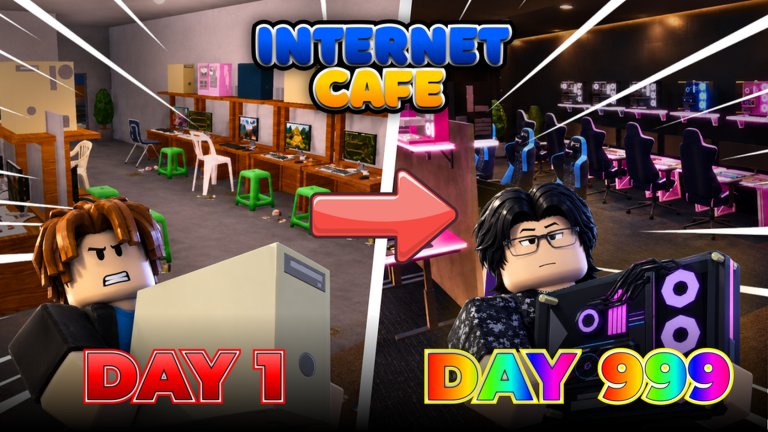
Customization is half the fantasy of Internet Cafe: your plot should feel like a real neighborhood computer shop, not a gray sandbox. Neminem’s experience calls out furniture unlocks, decorations, weather, customizable bases, and regular content drops. This guide is the umbrella layout page—how to theme boldly after the café can earn, and how to avoid décor that silently ruins traffic.
Deep dives now live on sibling pages so this article stays focused on composition:
- Prop unlocks & vanity vs income → Furniture & Decorations
- Storms, lighting, outdoor seating → Weather System
- Food-area timing & aisle rules → Kitchen & Food Area
- Seasonal buy/skip → Halloween Event
If you still need seats online, pause here and finish Getting Started plus PC Upgrades first. HUD refresher: Controls.
Design goals that respect the tycoon
- Readable entrance — players and customers should understand where to walk in under two seconds.
- Clear PC aisles — machines remain the product; décor frames them.
- Short collection loop — beauty that doubles walk time is expensive.
- Theme coherence — modern LAN, cozy local café, Halloween pop-up, or mixed kitchen+PCs.
- Update readiness — leave a little open floor for new props from future patches.
Layout blueprint
Zone A — Entrance & counter
Place counter, signage, and waiting space near the door. Avoid filling the threshold with seasonal trees or stacked chairs. One focal prop beats five clutter pieces.
Zone B — PC rows
Straight rows or clean L-shapes work best. Keep a lane wide enough for you and friends to pass without hopping furniture. Face screens toward aisles when the placement tool allows.
Zone C — Social / kitchen
Put food service adjacent to—not on top of—PC rows once you are ready for kitchen content. The kitchen should feel like a second offer, not a barricade. Timing, aisle-to-counter detail, and the “do not abandon monitors” rule are spelled out in Kitchen (including the KITCHENNADALVOKE era).
Zone D — Exterior & weather
Use outdoor pieces to sell atmosphere when the sky changes. Covered entries and simple outdoor seats look great in storms—if they never cover the door hitbox. Full weather checklists live on Weather System.
Furniture priority (gameplay first)
| Priority | Items | Notes |
|---|---|---|
| Essential | Desks/lines supporting PCs, functional chairs | Income linked |
| High | Counter, path mats, lighting for visibility | Helps flow |
| Medium | Kitchen appliances, menu boards | After PC stability |
| Flex | Seasonal sets, RGB shelves, posters | Theme |
| Danger | Oversized props in lanes, duplicate clutter | Remove if pathing breaks |
Match purchases to the Tier List: décor is mostly B/C until seats are solved. For unlock timing and vanity filters, continue in Furniture.
Working with codes that unlock vibe
CUSTOMIZATION and HALLOWEEN signal that the developers lean into themed expression. Redeem them on Codes, then:
- Install free décor in Zone A or D corners first.
- Use Halloween pieces as a temporary takeover of one wall or window bay instead of burying every seat in pumpkins—see Halloween Event.
- If a reward is dual-purpose (functional + cosmetic), place the functional side where it earns.
Theme recipes
Cozy neighborhood café
Warm lights, simple posters, modest plants, tidy counter, two clean PC rows. Kitchen snack area near the counter. Very Philippines computer-shop friendly without needing luxury spam.
Competitive LAN corner
Matched monitors, cable-aware placement, darker lighting, minimal clutter, loud focal wall. Great once upgrades on PC Upgrades are rolling.
Seasonal Halloween takeover
One haunted window bay, path-safe floor decals, orange accent lights, and a single hero prop. Keep machine faces unobstructed. Buy/skip detail: Halloween Event.
Kitchen hybrid
PCs on the left lane, kitchen on the right, shared center aisle to the register. Do not checkerboard appliances between every desk—expand only with the rules in Kitchen.
Weather-ready patio
Side benches, readable door silhouette, indoor lamps that survive dark skies. Build this after seats earn; iterate with Weather System.
Co-op decorating etiquette
Servers hold eight players. When friends visit for the Help a friend! style goals on Players / Badges:
- Ask before rearranging someone else’s carefully built lane.
- Help with heavy placement or funding tips, then return to your plot.
- Share theme ideas in chat instead of dumping random props into their doorway.
Maintenance loop after every shopping spree
- Sprint the entrance-to-register path.
- Sit (or test) each new PC row approach.
- Remove anything you clipped through.
- Confirm collections still feel short.
- Only then buy the next décor pack.
When updates drop new items
Read Updates for Halloween, kitchen, and customization notes. New items often tempt a full rebuild. Prefer a wing remodel: refresh one zone, keep earning zones intact, then rotate themes week by week. Re-test outdoor pieces after lighting patches using the weather checklist page.
Mixing customization with money goals
Set a décor budget per session—example: 20% of current cash after the next seat is funded. That single rule preserves the earn engine described in Earn Fast while still letting the café look alive.
Session template
- Confirm two+ seats complete.
- Fund the next income buy mentally.
- Spend only the décor slice on Zone A/D accents.
- Walk pathing once.
- Log off or return to PC upgrades—do not “just one more shelf” into bankruptcy.
Common customize mistakes
- Theming at zero complete seats.
- Using kitchen counters as PC barricades.
- Dark interiors with no lamps when weather hits.
- Copying a cluttered flex café on a smaller plot.
- Ignoring codes that already granted the prop you were about to buy.
Related reading order
- Controls — place/shop UI
- Furniture — what to buy
- Weather System — outdoor & lighting
- Kitchen — food wing
- Tier List — priority filter
- Updates — after patches
Customization is the long-term toy box of Internet Cafe. Treat pathing as sacred, themes as seasonal, kitchen as a side business, and weather as free drama. Do that and your base becomes a place friends remember—not a maze you regret building.
Frequently Asked Questions
Quick answers about codes, upgrades, and growing your café.
When should I start customizing my Internet Cafe?
After at least two finished PC stations are earning. Use a small décor budget so customization never blocks the next seat.
Where do I read about the weather system in detail?
Use the dedicated Weather System guide for outdoor seating, lighting, and after-update checklists.
Where should kitchen furniture go?
In a side zone with a shared aisle to the counter—not mixed between every PC. Full timing rules are on Kitchen.
Do Halloween decorations hurt income?
Only if they block paths or delay seat purchases. Keep seasonal props to walls, windows, and corners—see Halloween Event.
What page ranks décor versus PC parts?
The Tier List Hub places complete PC lines in S tier and most seasonal décor in B tier until income is stable. Prop shopping detail: Furniture.